Friday, October 18, 2013

The age or real magic with cool gadgets like MakerBot DIgitizer

scaled-2386


Now we have real magic. It’s here. It’s not always perfect nor is it quite consumer-ready but the $1,400 Makerbot Digitizer is one of the coolest things I’ve seen this decade.

Screen Shot 2013-10-17 at 10.16.08 AM

The Digitizer is essentially a turntable, a webcam, and some lasers. It uses Makerbot’s conveyor app to control the motion of objects on the turntable and then scans the points generated by the laser during the rotation. It works best with light, matte objects like ceramics, clays, and non-glossy plastics but with a little glare-reducing baby powder you can scan just about everything as long as its taller than two inches and small enough to fit on the platform.


To scan you simply load up the Digitizer software – an excellent, intuitive system that should be a model for all 3D printer and scanner makers – and, once you calibrate the system using an included, laser-cut object, you press Digitize. Nine minutes later you have a scan. The system interpolates missing information which can be good or bad, depending on the lighting, and then asks if you want to take a photo of your object. You then slide away a filter over the camera to reveal the bare webcam, shoot your, photo, and then share or print your object.

The process is addicting. When you put one object on you want to put another and another. Sharing these objects is an amazing feeling – it’s essentially the equivalent of dot-matrix teleportation. It will be amazing, then, when we get to the laser printed version of object teleportation.
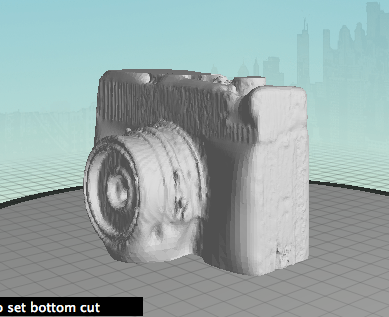
Are the scans perfect? No. Because of vagaries of materials, reflections, and ambient light a perfect scan is impossible. Thisscan, for example is far from a perfect replica of the original statute. The statue itself has tarnished to an even, matte finish but even with some effort I couldn’t get all of the detail. The Digitizer is like a mimeograph machine rather than a true scanner. It grabs only the important parts of an image and reproduces the rest the best it can. For example, the scanner couldn’t tell what to do with the lens on this OMO camera, below, and so essentially gave up, filling it in. I was able to scan the lens by turning the camera on its side.
Screen Shot 2013-10-17 at 10.20.08 AM

Take a look at this statue scan. I printed it fairly small just as a test but it grabbed a certain amount of detail on the statue but elided quite a bit more. In the end I created an approximate, not an exact, copy of the statue. Or take this beer stein for example. The handle sort of disintegrated but I suspect I could have gotten a far better scan if I dusted it down in baby powder. Scanning requires work and trade-offs but, in the end, you get approximately what you’re looking for.

  1. scaled-2384

  2. Screen Shot 2013-10-17 at 10.12.32 AM

  3. Screen Shot 2013-10-17 at 10.12.47 AM

  4. Screen Shot 2013-10-17 at 10.13.06 AM

  5. scaled-2383

  6. scaled-2382

  7. scaled-2385

Is the system perfect? Yes and no. When it works it works wonderfully. However, I’ve had some minor hang-ups in OS X that the Makerbot team as seen and is working on fixing. That said, I got a good scan 95% of the time and most of the errors were my own fault caused by excitement or ignorance of good scanning technique. You can see more of my scans on Thingiverse.


At $1,400 the system is also expensive. While I didn’t take apart the case it’s clear that the R&D and engineering that went into this – plus the fact that it was made entirely in Brooklyn – add a premium price to what is essentially a solid webcam and some Class 1 lasers. The hardcore among you will scoff at the price but when you want your scanner to work the first time, right out of the box, this product can’t be beat. There are better, far more expensive scanners out there but this hits the sweet spot at the intersections affordability, usability, and utility.

Can you do this all yourself? Absolutely. AKinect, a webcam, some lasers, and even youriPhone can create passable 3D models. But nothing I’ve seen can consistently produce quality results in a package that is nearly foolproof and surprisingly robust. I could imagine an archeologist taking this device to digs, an artist setting this up in a studio, or an engineer using this to model aerodynamics. It’s tough enough to withstand rough treatment by kids and adults and the quality, while in no way perfect, is close enough for the vast majority of uses.

What the Digitizer gets right is that it hides away all of the vagaries of 3D scanning and just leaves the magic. The system itself looks like something Jeff Bridges would use in Tron and the lasers, the ticking turntable, and the black case make it clear that this object is from the near future. This product leaves almost every other home computing advance in the dust and I feel like a kid again, amazed at hard drives, printers, and the ability to create things out of thin air.


Tags: Makerbot, Digitizer, Reviews

Filed Under: Gadgets, TC

Q3 with Google in the streets

google-sign

Google’s Q3 2013 earnings report has just crossed the wires, and they’re better than expected. The company reported that over the past three months, it generated $14.89 billion in consolidated revenue and $2.97 billion in net income, as well as non-GAAP earnings of $10.74 per share.

According to Yahoo Finance, analysts expected the company to report about $14.8 billion in revenue for the quarter and earnings of $10.35 per share. Fortunately for the search and advertising giant, that’s a big change from last quarter. The company missed Wall Street’s EPS and revenue expectations during its last go-round.

Investors are already reacting to the news: Google’s share price at market close was 1 percent, but at time of writing it’s surged nearly six percent in after-hours trading.

Screen Shot 2013-10-17 at 4.24.39 PM

More than a few people are keeping an eye on Google’s ad business, and more specifically the company’s cost per click. Online marketing firm The Search Agency reported the other day that it saw Google’s cost per click on the upswing, noting a 3.5 percent lift over the last quarter. Google’s new report points to something different though — specifically, it looks like CPC dipped 8 percent sequentially and 4 percent when compared to the year-ago quarter. That’s not exactly the sort of trend the company was looking to continue, as cost per click declined 6 percent sequentially back in Q2.

That advertising business is going to get a bit weirder in the coming weeks: Google has announced that it will use the photos and endorsements of its Google+ users to give some ads an extra boost of personal credibility. With that said, though, Google’s Enhanced Campaigns (which allow advertisers to devise a single ad campaign that can be deployed across multiple types of devices) should help the company cement its position in mobile. Meanwhile, Google’s paid clicks were up 26 percent year-over-year, and up 8 percent over the previous quarter.

This quarter also saw Google get a little bolder with hardware — its Motorola Mobility subsidiary released the customizable Moto X to generally positive reviews, and the curious $35 Chromecast dongle rocketed to the top of Amazon’s sales charts almost instantly. If anything, the former is a hair more interesting since the Motorola division has been posting loss after loss for the past few quarters, as well as dramatically trimming its headcount in a bid to cut costs. For now Motorola’s staff count seems to be holding steady, but the division only raked in $1.18 billion in revenue (or 8 percent of the total revenue pie) and reported a considerable $248 million operating loss.

This is a developing story, please refresh for updates.


Tags: google, earnings

Filed Under: TC

RingMeMaybe

image

  Cell phone numbers are a direct path that often lead straight to us, regardless of where we are or what we’re doing. And once we’ve given someone our number, they have it for good. And if things go south, you gone have to change your number.

Pretty much, but wat if each time you have a friend to whom one day u gone call it "it was" , what are you gone do, well your option will be to install RingMeMaybe, the app give you a chance to re-call a new number to which it will be linked to your number

Wednesday, October 16, 2013

Real world video games for $199

Artificial intelligence and robotics firm Anki is poised to debut its iOS-powered remote control Anki Drive car set on Oct. 23, and will be selling the toys exclusively at Apple Stores for a starting price of $199.

image

Anki Drive Starter Kit.

Anki Drive made a splash at this year's Worldwide Developers Conference in June, when the company was granted highly coveted demo time ahead of Apple's keynote.

In the live demonstration, Anki's cofounder and CEO Boris Sofman showed off four small remote control cars that use cameras, sensors and specialized software to zip around a black race mat without user intervention. The toys are connected via Bluetooth LE to an iOS device that can partially control steering and acceleration. Other game types allow players to race each other or the AI via the Anki Drive iOS app.

What makes the toy set interesting is the autonomy of each car. With the AI handling steering, players can take control of the gas and fire imaginary guns, as well as special weapons like a tractor beam, at other racers. Shooting bullets and other weaponry is limited to a car's line-of-sight, while effects are played out as if in a video game.

For example, if one player is trailing and strikes a critical hit on the car ahead of it, lights will flash and the toy will come to a halt or slow down as if disabled. On the iOS device, sound effects play and the handset vibrates in reaction to the strike. A point system grants players power ups and access to special abilities that can be used in future races.

Each car has its own "personality," or special attributes, such as speed, armor and increased weaponry. Anki says it tried to strike a gameplay balance by putting a cap on the number of "maxed out" cars, allowing for a more dynamic experience.


Aside from the above game modes, there isn't much in the way of direct interaction, though for Anki that's the point. The AI keeps the toys on course with little to no user intervention, while drivers "steer" for tighter or wider turns to gain an advantageous position on their opponents. Anki Drive is essentially a racing shooter video game brought to life.

The Anki Drive Starter Kit, which includes two cars and the racetrack, is priced at $199 and will be sold online and at Apple Stores on Oct. 23. Two additional car models will also be available for $69 each.

5s accelerometer bug linked to new chip

iPhone 5s accelerometer bug linked to new chip - Jason O'Grady

Several outlets have been reporting on an apparent hardware bug in the iPhone 5s accelerometer/gyroscope (see MacRumors). The defect manifests itself in accelerometer-based apps and Apple's Compass app, which show discrepancies of as much as 8 to 10 degrees compared to the iPhone 5.

In the gifimation above, Gizmodo discovered that EA's Real Racing 3 (running on a level plane) immediately registers a phantom leftward tilt when you start a new race on the iPhone 5s.

RealityCap, a developer of 3D APIs, theorizes that the bug may be in the new Bosch Sensortech accelerometer, a new part supplier in the iPhone 5s. In a blog post RealityCap CEO Eagle Jones points to the iFixit.

Apparently all accelerometers aren't created equal. Jones poured over the ST and Bosch datasheets and drew these conclusions:

Accelerometers have two key numbers that tell you the quality of their outputs. Note: in the spec sheets, and the next couple paragraphs, the abbreviation mg refers to milli-g, or one one thousandth of standard gravity, not milligram. The first key spec is the noise density (ST) or output noise (Bosch). This tells you how much random jitter you will see in measurements. At first it looks like the spec for the Bosch part is much worse, but this is deceiving as these numbers are reported for a specific measurement rate (bandwidth), and the ST datasheet doesn’t specify that rate. In our measurements, the noise output of the accelerometer in the iPhone 5S is reasonably similar to that of previous iOS devices.

The second key spec for accelerometers is the zero-g offset, or bias. This indicates the range for a roughly constant offset that will be added to every output sample of data due to manufacturing variance. This can also change over time due to mechanical stress or temperature variation. This is where we find the problem: the typical bias for the ST part is +/- 20mg, while the Bosch part lists +/-95mg. This almost 5x greater offset range is confirmed by our measurements, and is absolutely consistent with the failures being reported by users and the media. Specifically, a +/- 20mg offset range would translate to around a +/-1 degree accuracy range in tilt detection, and a +/-95mg offset translates to +/-5 degrees in tilt.

Jones notes that both parts cost about one dollar in quantity making it unlikely that Apple switched suppliers to save money. His theory is that Apple chose the Bosch part based on its lower power consumption (in normal mode the Bosch part uses 450W and the ST part uses 625W), concluding that it's a poor tradeoff for the inherent inaccuracy.

Unfortunately, hardware defects can't be patched with a simple iOS dot release. Luckily, Jones thinks that developers can work around the chip flaw by incorporating a calibration procedure into their apps - like the Compass app does when you first launch it. This would allow the app to determine the accelerometer bias which can then be subtracted from the data coming from the accelerometer to get a correct reading.

I compared Compass.app my iPhone 5s to my wife's iPhone 5c and they were pretty close, which appears to validate reportsthat both new iPhones use the same Bosch part. (I don't have an iPhone 5 on hand to compare them to). There's a 70-page thread discussing the issue on the MacRumors Forums, if you'd like to follow the blow-by-blow. 

T-Mobile announced a few new mid-range phones for their network

On Wednesday, T-Mobile announced a few new mid-range phones for their network. A couple are from Alcatel, which is a company that has never really brought their phones to the US. But they do have some nice devices. Back at Mobile World Congress they announced a device with some pretty high-end specs that was dirt cheap, of course it never made it's way out of Europe though.

The Alcatel One Touch Evolve and Fierce are mid-rangers that go for $29 and $19 down, respectively and will have an EIP of $3 and $6 respectively. Which really isn't that bad of a price. As you can see from the image above, it appears to be running near stock Android with a sort of icon pack on top. The Fierce is featuringAndroid 4.2, 4.5-inch qHD Display, 1.2GHz quad-core MediaTek processor and 4G speeds (it's not specified if that includes LTE or just HSPA+, but I'd assume the latter.). Not the Evolve features Android 4.1 along with a 1GHz MediaTek processor. It's more of a budget phone as you can tell. But still a nice looking one.

Onto the Galaxy Light. This one is also a mid-ranger from Samsung. It's got the same design that we've seen with many other Samsung devices. Nothing like the Galaxy Note 3, unfortunately. It's packing a 4-inch WVGA display, with a quad-core 1.4GHz processor, 1GB of RAM along with Android 4.2.2 – Jelly Bean. There is 8GB of internal storage along with a microSD card. It's also packing a 1800mAh battery with 5MP camera. So it should have some pretty good battery life considering the size and resolution of the display. There's no pricing or availability for the Galaxy Light yet, but I'd expect it to be priced around the same as theAlcatel One Touch Evolve and Fierce.

So we've got a few new mid range and low-end devices coming to T-Mobile. Which is great for those that just need a phone and don't need the power of the Galaxy Note 3, G2 or the Galaxy S4. It's also great to seeT-Mobile having so many phones in every price range for customers to choocse from.

The post T-Mobile Announces the Samsung Galaxy Light, Alcatel One Touch Evolve and One Touch Fierce appeared first on AndroidHeadlines.com |.


iPhone 5S Vs Nexus 5

Everybody wants to hear Google announce a Nexus 5 release date, but it’s clear that the company are continuing to keep their next flagship device a little more secretive for the time being. However, that hasn’t stopped early leaks from emerging and it looks like we have clear evidence that the Nexus 5 GPU is going to be one of the most impressive factors of the device.

Naturally consumers have already started comparing the the iPhone 5S Vs Nexus 5 since Apple has only just released their new iPhone, hyping up the new 64-bit A7 processor in the process as well.

GPU is an area that consumers are a lot more interested though and it looks like some early iPhone 5S VS Nexus 5 GPU benchmark tests have arrived and have produced some surprising results. The video we have to show you was uploaded in September, but may have slipped under the radar without gaining traction.

The video shows evidence that despite being an unreleased and unofficial product, the Nexus 5 has actually outperformed the iPhone 5S in some benchmark tests coming courtesy of GFXBench 2.5 Egypt HD. The author of the video shows his level of surprise and enthusiasm on the early victory for Google’s unreleased device, which could be an indication that the Nexus 5 is going to be a very powerful device indeed.

Nexus 5 already topping the iPhone 5S in benchmarks..

Nexus 5 already topping the iPhone 5S in benchmarks..

If the Nexus 5 has smoked the iPhone 5S now in early benchmark tests, imagine the reception that the device is going to get once Google begins their marketing campaign. The iPhone 5S has already been proven to be a fantastic addition to Apple’s portfolio, but are you starting to wonder if Google could bring out a significantly more powerful device?

Watch the benchmark video below comparing the two handsets and let us know what you think about the early win for the Nexus 5. Are you prepared to wait as long as it takes to get your hands on this phone?

Google map tricked iOS

The mapping giant updates its app for iPhone and iPad with new traffic and route overviews, tips for new users, and language support for Arabic and Hebrew.

Screenshots of the Google Maps app for iOS.

(Credit: Google)

Google Maps updated its iOS app on Tuesday with new route and traffic features. According to Google, the update brings "faster access to navigation," "tips and tricks" for beginning users, and support for Arabic and Hebrew.

Version 2.3.4's navigation feature helps users better decide among various traffic and route options. The app now has a smaller map within the route selection screen, which lets people more easily compare directions based on traffic and other conditions. The "tips and tricks" section gives users advice on how to use the app and its various features, like turn-by-turn directions.

Google acquired the mapping app Waze in June, which is an Israeli startup. So, adding in language support for Arabic and Hebrew makes sense. In August, Google added real-time traffic reports from Waze users into its iOS and Android apps.

Google released its standalone maps app for iOS last December, three months after Apple replaced Google's technology with its own inside the Maps app that ships on iOS devices. The main attraction, besides Google's more mature set of mapping data, was spoken turn-by-turn directions, something that Android users had enjoyed for years but wasn't offered out of the box for iOS users until iOS 6.


Groundbreaking MOTO X

The Moto X display exhibits the best power efficiency and beats Apple's iPhone 5S, according to two recent research notes from ABI Research.

One, released Tuesday, trumpeted the display, supplementing a note released last week.

"After Google acquired Motorola, we now have the first Google-influenced phone with some very innovative engineering," Jim Mielke, VP of engineering at ABI Research, said in a phone interview.

Today's note said that the Moto X may be leading the way toward displays that don't have to constantly dim to save power.

The display found in the Moto X...has the best performance observed in a mobile display to date...[the] AMOLED display draws just 92mA [milliamps] during bright conditions and 68mA while dim. This level of performance is so significantly improved that other factors are more likely to govern battery life now. Automatic dimming and short idle periods before turning off the display will be less crucial and may even be features that fade away from all handsets soon.

By comparison, the iPhone 5s draws 80mA and 220mA (about 2.5 times as much as the Moto X) while sporting 20 percent fewer pixels than the Moto X, he said.

The power consumption on Moto X's always-on voice commands is also impressive, Mielke said.

"Features like always-on voice commands typically would draw too much current to be practical, but the Moto X accomplishes the task with 4.5mA allowing the phone to maintain over 200hrs of standby time," he said in a statement released last week.

Some of the Moto X's engineering is a step ahead of Apple's, Mielke said.

"The transition in innovation and solid engineering between the two phones is very clear," he said in the interview, adding that the 5S' fingerprint ID access lock was first introduced a few years back by Motorola on the Atrix HD 4G.

And Apple's new A7 chip -- which has been well-received -- draws more power during certain operations compared with its predecessor, the A6.

"The A7 processor drew 1100mA during fixed point operations and 520mA during floating point operations. The iPhone 5 drew 485mA and 320mA for the same test," he said.

He concludes his written comments with a zinger. "The combination of solid engineering, creative features, and timely introduction of those features was Apple's trademark but it has faded in this category over the last two years."

One man's solution to data storage

Who needs access to an online service when you can buy a cloud drive and keep it on the shelf?

Killian Fox

When you try to visualise the cloud, what comes to mind? Despite knowing that the information we upload to file-hosting services such as Dropbox and iCloud is held in vast server farms in deepest Oregon or the chilliest reaches of Scandinavia, I still find myself picturing a big grey-white cumulus puff of data swirling around overhead. I suspect I'm not alone.

Now a different picture is beginning to form. Earlier this month, I tried a new "personal cloud" storage device from Western Digital. Imagine, reducing one of those server farms to an object the size of a thick paperback, which plugs into your router at home, and you've got My Cloud. It differs from a standard external hard drive in that it's networked – you can access your files remotely over mobile data or wi-fi on a variety of devices, including phones and tablets – and it differs from file-hosting services in that you are the host and your cloud is occupied only by those with whom you choose to share.

For the slightly befuddled cloud user with information strewn across a number of services – I use Dropboxand Google Drive for important documents, iCloud for music and a hard drive to back everything up – My Cloud appears attractive for several reasons. It promises tidiness, security – using 128-bit encryption to protect files in transit and password protection on the box – and accessibility at a reasonable price.

The 2TB model costs £129.99, whereas 200GB of storage on Dropbox costs £125 a year (though cheaper file-hosting options exist). It is by no means the first of its kind: network-attached storage (NAS) devices have been around for years and there are other storage products on the market offering remote access and media streaming. What sets My Cloud apart, says the manufacturer, is its accessibility, and how "cloud-centric" it is: the mobile app integrates with Dropbox and Google Drive, among others. WD are also keen to emphasise how easy it is to set up.

Back at home, I plug in the glossy white box and download set-up software from the WD website. Within minutes, it's up and running on my laptop. I upload some content: a few Talking Heads tracks, a photograph of London in the mist, an old Word document. Then I download the My Cloud app on to my phone and step outside. The interface is simple and Psycho Killer plays after a second's delay. I'm impressed. A day later I'm still impressed, though a tad beleaguered. It's my own fault for being a hoarder, but my iTunes library took 12 hours to upload, and I haven't even started on photos, videos and documents. My broadband and mobile providers are to blame for patchy service, but accessing my content, whether at home or across town, is not always so seamless. When I urge my wife to commit her entire digital existence to My Cloud, she asks what happens if the box breaks or someone steals it. Unlike some other NAS devices, My Cloud has only a single drive, which means you need an external backup in case it dies. The answer is to buy a second backup hard drive and store it in a separate location safe from theft. By the time I work this out, my wife has gone to bed.

"The big selling point with devices like these is security," says Daniel Bangs of London-based tech consultancy LeftBrain. "If you're the kind of person who isn't comfortable having your data in the cloud, then I guess it's a good idea." However, instead of making life easier, he says that the device could complicate matters, especially if you're pairing it with other cloud services and hard drives. "It's an extra piece of equipment you have to maintain. Ultimately, it's worth considering how secure you need your files to be."A week later, I'm still using My Cloud. Perhaps it's because I've invested so much time loading it up, or because the idea of having my data at home is preferable to entrusting it to some faraway corporation. Either way, it's certainly better than the patchwork arrangement I had before. And my conception of the cloud is that little bit more solid now than it was a week ago.

A mobile phone coverage map broke rules

A mobile phone coverage checker on provider 

EE's website has been ruled misleading by the advertising watchdog for not making clear that it is "only a guide".

The Advertising Standards Authority (ASA) received a complaint from aT-Mobile customer after parent company EE reported that 3G coverage for his postcode was "excellent" when the man had no mobile phone signal at home and a poor signal outside.

The man said the results displayed when he entered his postcode read UK mobile coverage for 3G calls and internet was "excellent", with further text saying: "Fast, reliable internet access and high quality calling. Available on 4GEE, Orange and T-Mobileplans."

Text below a map, also shown, said: "This map is only a guide and not a guarantee of service availability in a particular location. It shows outdoor coverage only and may include locations where mobile devices don't work.

"As with all radio-based systems, service may be affected by a number of local factors, such as building materials, tree cover and weather conditions ..."

Each of the mobile networks have coverage checkers on their sites, which can give an indication of 2G (voice and text) and 3G (mobile broadband) coverage according to postcode.

The strength of a mobile signal varies depending on where the user lives and the service provider.

T-Mobile said the structure and design of the coverage checker was updated on July 24, and it was willing to make further amendments if it was considered necessary.

The company acknowledged the complainant had received poor coverage, but said that might be as a result of the device, the structure of his home or living in a very small area of the postcode that received poor coverage.

They also emphasised that consumers could obtain a refund if the coverage was not as expected.

Upholding the complaint, the ASA said: "We considered the ad did not make sufficiently clear that the claims that appeared under the 'coverage results' were intended as a guide and that coverage could be affected by a range of factors.

"We therefore concluded that the ad breached the code."

It ruled that the advert must not appear again in its current form, adding: "We told T-Mobile to ensure their future advertising made immediately clear the conditional nature of coverage checker results."

Is LTE available at your area

Some folks have more Gs than others, no matter what the carriers try to tell us


LTE is something that many of us will take for granted. Verizon and AT&T keep telling us about new locations, and around the world companies like Vodafone and Rogers have an impressive list oflocations they service withLTE high-speed data.

But in many areas, like the English countryside or the great plains of the United States, mobile broadband just hasn't happened. We know people live there, and enjoy their Androids as much as the people who live in New York or London or Amsterdam do — even if they don't have multi-megabit download speeds. It's time to get a measure if just what sort of service you, the AC faithful, are actually seeing from the folks you send money to every month.

There's a poll in the sidebar to the right, and it's been embedded after the break to make things easy. Let us know if you have access to LTE where you live, work and play.

Tuesday, October 15, 2013

IBM's Watson uses Jeopardy skills to become House-like medical diagnostician

IBM's Watson hasn't been in medical school long, but he already has two jobs. Teaming with the Cleveland Clinic, Big Blue researchers have developed WatsonPaths, a diagnosis and education project, and Watson EMR Assistant, a tool for delving deep into medical records. WatsonPaths is the more ambitious of the two, drawing on question-answering skills acquired from its Jeopardy days to examine medical cases from all angles. It'll gather data from journals, texts and on-the-job training, helping doctors improve differential diagnoses and create better treatments. When first deployed, WatsonPaths will be used as a classroom training tool after physicians have decided what's wrong with a patient, but doctors can already see its real-world potential as a clinician.

Researchers are also taking advantage of Watson's natural language talents to scour medical records with the Watson EMR Assistant project. The goal is to analyze unstructured patient records -- which can easily pass 100MB over a patient's lifetime -- with "a deep semantic understanding of the content." That'll take a lot of the grunt work out of parsing such data, letting physicians more easily see the relationship between clinical concerns, lab results and medications in order to provide better care. Despite all that prowess, Watson will mostly remain a learning tool and research project pending further development at the clinic. If the researchers are thinking primary care, however, they may want to bump its people skills.

Monday, October 14, 2013

Top ten must have app's on iPhone

Apps make the iPhone the powerful little device that it is. And Here are ten apps I want every iPhone owner to know exist.

Picking ten essential iPhone apps isn't easy, especially considering there are dozens of excellent apps, and hundreds of very good ones. Beyond the most highly acclaimed apps are ones that fit different personality types or special interest groups. I, for one, love language-learning apps and fitness apps, but I recognize that they're not everyone's cup of tea. Rather, this list aims to hit the most important apps that are applicable to just about everybody.

The ten apps on this list of must-haves covers the most basic functions most of us do with our phones: find information, get directions, communicate with others, and so on. I didn't include here apps that come preinstalled on the iPhone, even though many of those are indispensable, such as Contacts, Mail, Music, iTunes, and Calendar.

Throughout the article, you'll find links to full reviews of the apps when available, where you can often findtips on how to use the apps best, as well as any snags we found while testing them.

You can find even more recommendations for iPhone apps in our 100 Best iPhone Apps list as well as our list of the best 50 Free iPhone Apps. And if you have suggestions for other essential apps, please do share them in the comments.

—Next: Apps 1-5 >

IPHONE APPS 1-5

Awesome Note (+Todo/Calendar)

$3.99

Awesome Note (+Todo/Calendar) is among the best multi-purpose task management apps in the App Store. It gives serious list makers and task masters utilitarian tools to help them keep track of ideas and chores, and graphical customizations at nearly every turn. With customizable alerts, repeat settings, a handy calendar, and the ability to sync with Google Drive and Evernote, Awesome Note is hands-down the to-do app worth buying.

Dashlane

Free, subscription for full service optional

Dashlane is a simple and elegant password manager app for iPhone. As with any password manager, you need to set one strong password for your Dashlane account, and all other passwords can be generated (on a computer or laptop) and saved automatically to your account. From the iPhone app, you can access your login credentials and even copy and paste the encrypted passwords into apps and mobile websites when you need to use them. The app is free to download and use, but you'll hit some a few limitations with the free version. A Premium account costs $4.99 per month or $39.99 per year and includes syncing, which is a vital part of the service if you use the iPhone app. (Some legacy users are grandfathered into getting syncing with a free account.) Most importantly, Dashlane is extremely secure, keeping your information private and encrypted.

Dropbox

Free

Dropbox remains one of the best known names in the file-syncing game. For many computer users, the word "Dropbox" is synonymous with file syncing and sharing. It's been in the arena a long time, and as a result, it integrates with dozens upon dozens of other apps and services. Dropbox is a great tool for giving yourself and your collaborators access to files of all kinds, from music to videos to spreadsheets, from anywhere you have an Internet connection, courtesy of its mobile apps—including Dropbox for iPhone. If you're an existing Dropbox user, there's no question: You should have the Dropbox iPhone app.

EasilyDo

Free

EasilyDo connects to your email accounts, social media accounts, and other online spaces, then asks if you want it to automate simple tasks that you might need to do, such as post a "happy birthday" message to a Facebook friend or add contact details to your address book of someone new who has just emailed you. Some of my favorite tasks are package tracking (after you purchase an item online and receive a shipping number) and saving the contact information of a new person who has emailed you to your iPhoneContacts.

Evernote

Free

Everyone will tell you to download Evernote, but few are able to put into words why it is such an amazing service. The problem with convincing someone of Evernote's worth is it is a uniquely personal tool. Everyone uses it differently. To summarize, the free iPhone app synchronizes notes of all kinds, like text notes, audio recorded notes or voice memos, and pictures, and then makes them all highly searchable. It doesn't sound exciting, but the moment you figure out your own use case for Evernote, I swear you will never look for a replacement (the company highlights different use cases on the Evernote blog; do skim it). The app excels as a pared-down word processing program, and Evernote integrates with dozens of other iPhone apps. When it comes to staying organized, keeping track of ideas, and writing things down, Evernote for iPhone does the heavy lifting for you.

—Next: Apps 6-10 >

IPHONE APPS 6-10

Google Maps

Free

Of all the apps on my iPhone, Google Maps is among the top five that I use the most. Google Maps is still the best free map app you can get on an iPhone. You can look up addresses and get turn-by-turn directions in real time. If traffic seems like a problem, Google Maps can skirt you around it. Bicyclists in select areas will find green-highlighted routes to steer them to safer riding. Sure, there are a few improvements I'd like to see (better integration with saved map locations, for example), but Google Maps remains the best there is. It's an app every iPhone owner needs to have.

HealthTap

Free; optional in-app purchases

Sign up for a free HealthTap account, and you can ask medical professionals specific questions and expect an answer within about 24 hours. It's not for emergencies—no health and medicine apps are. It's free to ask a question, but those Q&As will be made available to other users to read. If you want to ask a question in private, ask a question of a specific doctor, and be ensured your follow-up question will be answered by the same professional, you can pay $9.99.

LinkedIn

Free

LinkedIn remains one of the most important online networks for professionals to join. The thorough iPhoneapp helps you stay on top of business relationships, job opportunities, and other career-related events like no other app. Having access to your professional network and all the details of those important relationships at your fingertips when en route to a meeting or while at a large conference is invaluable. TheLinkedIn iPhone app is an essential tool for business professionals no matter which industries are the core focus of their work.

Snapseed

Free

Snapseed is our Editors' Choice among iPhone camera apps for its non-destructive editing capabilities, powerful photo correction, localized adjustments, and many image-enhancing effects. Snapseed also works very well when it comes time to share photos, integrating with all the major social networks, and it sports a clear and innovative interface. Moreover, Snapseed is the only iPhone app that even approaches the power of desktop digital image editing software. It used to cost about $5, but it's now free. Hooray! For more camera app recommendations, see "9 Great iPhone Camera Apps."

Twitter

Free

Twitter has quickly become one of the most important destinations on the Web. Whether you use it for business opportunities, for second-screen fodder while watching television shows, news, education, or just for bantering with friends, you need the Twitter mobile app. With a clean design and simple but smart look,Twitter's own iPhone app is the one to use to reach the network.