Saturday, December 28, 2013

Writer Keith tell us about the 2013 games , well which one was yours

Keith Stuart

Grand Theft Auto 5 cast a magnificent shadow over every other title released this year, shifting almost 30m copies thanks to its deranged plot, astonishing visuals and stylised hyper-violence.

More meaningful, but certainly no less visceral, were some engrossing action-adventure epics. The new Tomb Raider reboot brought some depth to gaming legend Lara Croft, while post-apocalyptic thriller The Last Of Us, had a tragic parental relationship at its core. Blockbuster games are finally learning how to tell mature stories, even if they do still quite like blasting zombies into space with shotguns. It wasn't all kill, kill, kill, however. The brilliantly designed Super Mario 3D World and utterly cute Pikmin 3 brought some attention to Nintendo's maligned Wii U console.

Meanwhile, in smartphone gaming, Angry Birds Star Wars and its sequel did as well as you'd expect for such a gigantic franchise mash-up: more than 100m downloads. Star Wars: Tiny Death Star – a merger of Star Wars with popular mobile title Tiny Tower –was a hit.

Most importantly, this was a brilliant year for small games made by independent studios, usually for the PCand Mac. Papers, Please made a compelling and thought-provoking experience out of being a border guard, while the puzzle adventure Gone Home created an engrossing story about dysfunctional families with no characters or dialogue. These intelligent, idiosyncratic titles pointed to a bizarre, barely conceivable future in which we won't have to jump out of planes, rob banks or shoot baddies to have a good time.

Wimbledon final

17.3m watched Andy Murray's Wimbledon victory against Novak Djokovic on BBC1. 120,000 tweets sent at the end of the match.

Alcatel gives you two in one

1 / 3

Alcatel has been busy this year. Its One Touch Evolve and One Touch Fierce recently making their debut on the T-Mobile network, and the One Touch Idol being sold direct to customers following a high visibility ad campaign tied in with the Iron Man 3 movie. Now, it has announced a new, high-spec flagship phone named the Idol X+

Interestingly, Alcatel will bundle the new phone with the Boom Band, a Bluetooth fitnesstracker for your wrist, which syncs up with a specially made app installed on the Idol X+. The tracker monitors both movement and sleep, plus it will warn you if it loses contact with the phone, ensuring you know if it has been left behind. It also has some of the features we associate with a smartwatch, such as showing caller ID, and alerting the wearer of incoming messages. Fitness trackers like the Nike FuelBand have jumped in popularity this year, and it's exciting to see one included with a smartphone.

The Idol X+ itself is a sequel to the Idol X, which debuted in February. It was a 5-inch smartphone with a 1080p screen resolution and a quad-core MediaTek processor. The Idol X+ retains the same size and resolution screen, but replaces the quad-core chip with MediaTek's new octa-core chip.

This is the second outing for MediaTek's MT6592 processor in as many weeks, as Huawei slotted it inside the new Honor 3X, which was announced on December 16. Unlike Samsung's early Exynos 5 Octa chip, the MT6592 has the ability to drive all eight-cores at once. Alcatel has squeezed all the available power out of the chip too, claiming it'll run at 2GHz, beating Huawei's 1.7GHz speed. It's joined by 2GB of RAM, a 13-megapixel camera, and a 2500mAh battery.

The Idol X+ is being released in China under the TCL brand name, where it'll cost the equivalent of $330 without a contract, in mid January 2014. TCL brands hardware it sells internationally as Alcatel, and it had a very busy stand at Mobile World Congress this year. There's every chance we'll see an Alcatel branded Idol X+ – perhaps with the One Touch name attached – at CES or MWC in 2014, although no official announcement has been made regarding the phone's future availability.

The right Bluetooth keyboard for your tab

1 / 7

Tablets make great consumption devices for video, books, magazines, and pictures, but they're also good for productivity with a little help. A Bluetooth keyboard is a must if you want to get some work done that involves a lot of typing – just know that not all keys are made equal.

Tablet keyboards often lack key features that make “real” keyboard so easy to use, like goodtravel (how hard you have to press) and tactile feedback (the springiness or responsiveness of keys), well-sized and spaced keys that won't have you mashing two or three at once, and access to often used functions. Good keyboard designers can incorporate all of these even into small devices. Here are some examples of the best:

Best Bluetooth Keyboard for iPad and Android Tablets

Standalone keyboards aren't bound by the size of a specific tablet and thus are more versatile. For instance, the iWalk Executive Bluetooth keyboard ($60) works just as well with iOS as it does with Android tablets and smartphones. We like that it's light and thin while still offering decent tactile feedback, key travel, and key size. No oddly placed or smushed-together keys here.

The Executive's cover is also the tablet/phone stand and keeps the device close so you don't have to reach far for taps. The kickstand allows for a few different angles, though the range isn't wide. For something so light it lasts a long time on one charge. Even though the faux-leather look isn't as classy as the MiniSuit for the Nexus 7, the overall aesthetics are above average for Bluetooth keyboards in this price range.

Best Keyboard Case for iPad Air and iPad Mini

To protect both the front and back of the iPad you need a folio case, and Zagg makes a great one. The ZaggKeys Folio for iPad Air and iPad Mini ($74 – $80) has a sturdy back to snap the tablet into and a hinge that allows for multiple positions. It's close to a clamshell design but without the bulk and weight associated with Windows 8 keyboard docks.

The keys themselves are well-sized with only a few shrunken ones and none in odd/awkward places. They offer good travel for a case so thin and are backlit in blue to boot. We also really like the control key row above the number row that give you one-touch access to media controls, lock screen, even Back and Forward.

There's a similar case for iPad generations 2, 3 and 4 with the same keyboard but a different folio design.

Best Keyboard Case for Nexus 7

Just as with the iPad Mini, keyboard cases and folios for small Android tablets have to compromise on size to fit with the screen size. So you want a case that mitigates this problem the best it can. The MiniSuit Keyboard Stand Case for Google Nexus 7 (2013) ($28) offers good balance between size and typing comfort. The keyboard portion of the folio is thick enough that keys have deeper travel than you'll find on most portable keyboards and a good size battery so you won't have to charge it as often. It's not so thick that the case becomes unwieldy.

The case itself is made of a leather-like material that looks good and offers moderate protection. Your Nexus will stay snug in the upper pocket whether you're using it or just carrying around. Bonus: opening and closing the folio turns the screen on and off. The kickstand on the back only offers one position which is ideal for typing, just not always for watching video. You can fold the keyboard under the tablet for touch-only use, but if you're going to use it this way for a while it's still better to slip the tablet out.

Best Keyboard Cover for the iPad, iPad Mini, and iPad Air

Logitech's Ultrathin covers for the iPad and iPad Mini ($75) have always been a big favorite due to the slim and lightweight design and the convenience of attaching it to the tablet on the magnetic edge, just like the Smart Cover. After the iPad Air debuted Logitech made a version for Apple's newest tablet ($100) that is just as great as previous models. The thinness means that key travel is shallow, though that is not a very big problem when you're going for ultra portability above all else. Keys are a good size and well spaced on the large versions; even touch typists will be able to get up to speed after a short time getting used to them. The Mini's keyboard is somewhat cramped due to the size of the tablet. This compromise is necessary if you want a keyboard and cover in one.

As a cover, the Ultrathin protects the screen but not the back of the iPad and turns the display on and off. The metal back looks enough like the iPad's own aluminum finish that they blend aesthetically, keeping things classy even when you're getting work done.

Best Clamshell Case for the iPad

Are you jealous of all those Android and Windows 8 2-in-1 devices that go from tablet to laptop-like clamshell with only a click? Apple hasn't seen fit to jump on this bandwagon, so you'll have to turn elsewhere for this functionality. The ClamCase Pro ($170) is such a best – a keyboard case made from aluminum and plastic that turns your iPad or iPad Mini into a laptop-like device (an iPad Air version is coming).

The aesthetics here might fool you into thinking it's an Apple product since the package looks very close to a MacBook Air with the iPad inside. One big difference: the 360 degree hinge makes the whole thing work like the Lenovo Yoga. Fold it back completely for tablet use, or use the base to prop the iPad up for viewing mode. Compared to the iPad alone, the ClamCase is relatively heavy at 3 pounds, though that solidity means it's tough and durable; an acceptable trade-off.

Best Bluetooth Keyboard for Android and Windows 8 Tablets

We're starting to see more Windows 8 tablets that are truly tablets and not part of a 2-in-1 package with a keyboard. That doesn't mean you won't still need physical keys (especially considering the annoying Windows on-screen keyboard). Per usual, Logitech has the answer. You might recognize the company's Tablet Keyboard for Windows and Android ($63) because it's almost exactly the same as the one made for Android and iPad from a couple of years ago. This model is made to work with Windows 8 and RT plus Android 3.0 and above (including smartphones) and includes special keys like the Start button and media controls.

This is not the thinnest or lightest keyboard we've used, but if you're going to do a lot of typing you will appreciate not only the size of the keys but the travel and tactile feedback. The keyboard is light for it's size and slim enough that it won't take up too much room in your bag. The cover does double duty as a tablet stand and will hold screen sup to 13 inches.

Top accessories to have before the end of the year

Top accessories for the past year

Looking at picking up something to complement your new Android phone over the holidays? The AC editors been using a whole bunch of different smartphone accessories without our devices in the past twelve months, and each of us have selected five of our favorites to round off 2013.

I'm kicking things off with a couple of cases, some replacement back covers, an essential wireless charging add-on and one of our favorite wearables of the moment. Check past the break to get started!

HTC One Double Dip Flip Case

With two ridiculously loud and bassy BoomSound speakers and a top-notch display, the HTC One is one of our favorite phones of the year, and one suited to audio and video playback. But like most modern phones, the HTC One lacks a kickstand, meaning you've got to hold it in front of you to get the full benefit of those speakers. The solution? HTC's official flip case, which as well as protecting the front and rear of the device doubles as a kickstand.

Buy HTC One Double Dip Flip Case ($31.95) Samsung Wireless Charging Kit for Galaxy S4

This year I've become more and more convinced of the value of wireless charging. Nothing beats the convenience of having a constantly-charging phone without worrying about wires and connectors. Samsung's official wireless charging kit for the Galaxy S4 isn't cheap, but it gives you everything you need to turn your GS4 into a wirelessly-charging beast. There's a replacement back cover for the phone, which adds a little thickness to the device, and a bowl-like charging pad with an LED to indicate when everything's working.

As the whole system is based on the Qi standard, the charging pad works just fine with other Qi-compatible devices like the Nexus 4 and Nexus 5. There's also a version for the Note 3 which comes with a similar charging pad, and a different charging back for that device.

Buy Samsung Wireless Charging Kit for Galaxy S4 ($86.95) Pebble Smartwatch

While the Pebble is only technically an accessory, it's my top “companion device” of the year, and a sign that there's a ton of untapped potential in the wearables space. Beyond notifications on your wrist — which can be hugely useful if you're the sort that needs to be constantly connected — Pebble boasts highly customizable watch faces and built-in music controls. Third-party apps let you expand the watch's functionality even further, and the upcoming app store should do even more to extend the feature set of the smartwatch.

Buy Pebble Smartwatch ($149.99) Motorola Shells for Moto G

The Moto G comes with a nondescript black back cover out of the box, and that's all well and good. But Motorola's aftermarket “Shells” for the handset look and feel so much better. The shells come in a wide range of hues — our favorite is the soft-touch lime green, which adds a splash of color to our favorite budgetsmartphone of 2013.

Buy Motorola Shells for Moto G ($14.99) HTC One Max Power Flip Case

The HTC One Max isn't our top phone of the year. It might not even be the top device in its category. But we have to admire the insane genius of strapping a battery to the front of a flip case and attaching it to an already massive 5.9-inch smartphone that already boasts impressive longevity. Aside from the built-in 1,150mAh battery, the HTC One Max Power Flip Case performs the same function as the equivalent for theHTC One. It shields your phone from damage and doubles as a kickstand, which makes even more sense for a big-screened handset. If you've got a One Max, this is a compulsory purchase.

Buy HTC One Max Power Flip Case ($69.95)

Comment on this article!

It has been a long time

Hi, 

It has been a long time since I posted a new news I would like to say ..................... glad to be back.

Merry Christmas

Monday, December 16, 2013

It has been a long time

Hi, 

It has been a long time since I posted a new news I would like to say ..................... glad to be back.

People Facebook knows

Jennifer Golbeck, director of the Human-Computer Interaction Lab and Professor at the University of Maryland, reports via Slate that these discarded thoughts don't completely disappear.

Instead Facebook uses a code that keeps track of every time you delete a would-be message and sends metadata about that message back to its own data bases.

A new research paper written by Facebookdata scientist Adam Kramer and Ph.D. student Sauvik Das examines the reasons for Facebook users' “self-censorship” and takes a look at millions of users' “aborted status updates, posts on other people's timelines, and comments on others' posts.”.

Facebook is keeping a record of all the data surrounding self-censored posts such as what time it was almost posted and whether it was set to be posted on a friend's page or on the user's own page.

Kramer and Das say that Facebook wants to understand all the reasons that people decide against posting because the company “loses value from the lack of content generation” every time a would-be post gets the axe.

Golbeck concludes that: “Facebook's desire to get users to post absolutely everything that comes into their heads is somewhat perverse because the company is essentially encouraging its users to lower the standards of what they share with their friends.

“So Facebook considers your thoughtful discretion about what to post as bad, because it withholds value from Facebook and from other users,” she writes. “Facebook monitors those unposted thoughts to better understand them, in order to build a system that minimizes this deliberate behavior.”

Friday, October 18, 2013

The age or real magic with cool gadgets like MakerBot DIgitizer

scaled-2386


Now we have real magic. It’s here. It’s not always perfect nor is it quite consumer-ready but the $1,400 Makerbot Digitizer is one of the coolest things I’ve seen this decade.

Screen Shot 2013-10-17 at 10.16.08 AM

The Digitizer is essentially a turntable, a webcam, and some lasers. It uses Makerbot’s conveyor app to control the motion of objects on the turntable and then scans the points generated by the laser during the rotation. It works best with light, matte objects like ceramics, clays, and non-glossy plastics but with a little glare-reducing baby powder you can scan just about everything as long as its taller than two inches and small enough to fit on the platform.


To scan you simply load up the Digitizer software – an excellent, intuitive system that should be a model for all 3D printer and scanner makers – and, once you calibrate the system using an included, laser-cut object, you press Digitize. Nine minutes later you have a scan. The system interpolates missing information which can be good or bad, depending on the lighting, and then asks if you want to take a photo of your object. You then slide away a filter over the camera to reveal the bare webcam, shoot your, photo, and then share or print your object.

The process is addicting. When you put one object on you want to put another and another. Sharing these objects is an amazing feeling – it’s essentially the equivalent of dot-matrix teleportation. It will be amazing, then, when we get to the laser printed version of object teleportation.
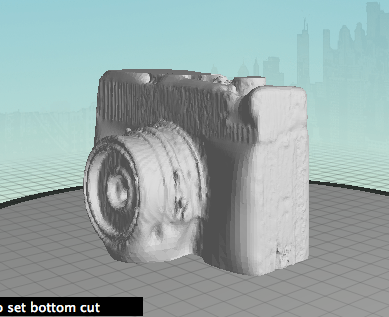
Are the scans perfect? No. Because of vagaries of materials, reflections, and ambient light a perfect scan is impossible. Thisscan, for example is far from a perfect replica of the original statute. The statue itself has tarnished to an even, matte finish but even with some effort I couldn’t get all of the detail. The Digitizer is like a mimeograph machine rather than a true scanner. It grabs only the important parts of an image and reproduces the rest the best it can. For example, the scanner couldn’t tell what to do with the lens on this OMO camera, below, and so essentially gave up, filling it in. I was able to scan the lens by turning the camera on its side.
Screen Shot 2013-10-17 at 10.20.08 AM

Take a look at this statue scan. I printed it fairly small just as a test but it grabbed a certain amount of detail on the statue but elided quite a bit more. In the end I created an approximate, not an exact, copy of the statue. Or take this beer stein for example. The handle sort of disintegrated but I suspect I could have gotten a far better scan if I dusted it down in baby powder. Scanning requires work and trade-offs but, in the end, you get approximately what you’re looking for.

  1. scaled-2384

  2. Screen Shot 2013-10-17 at 10.12.32 AM

  3. Screen Shot 2013-10-17 at 10.12.47 AM

  4. Screen Shot 2013-10-17 at 10.13.06 AM

  5. scaled-2383

  6. scaled-2382

  7. scaled-2385

Is the system perfect? Yes and no. When it works it works wonderfully. However, I’ve had some minor hang-ups in OS X that the Makerbot team as seen and is working on fixing. That said, I got a good scan 95% of the time and most of the errors were my own fault caused by excitement or ignorance of good scanning technique. You can see more of my scans on Thingiverse.


At $1,400 the system is also expensive. While I didn’t take apart the case it’s clear that the R&D and engineering that went into this – plus the fact that it was made entirely in Brooklyn – add a premium price to what is essentially a solid webcam and some Class 1 lasers. The hardcore among you will scoff at the price but when you want your scanner to work the first time, right out of the box, this product can’t be beat. There are better, far more expensive scanners out there but this hits the sweet spot at the intersections affordability, usability, and utility.

Can you do this all yourself? Absolutely. AKinect, a webcam, some lasers, and even youriPhone can create passable 3D models. But nothing I’ve seen can consistently produce quality results in a package that is nearly foolproof and surprisingly robust. I could imagine an archeologist taking this device to digs, an artist setting this up in a studio, or an engineer using this to model aerodynamics. It’s tough enough to withstand rough treatment by kids and adults and the quality, while in no way perfect, is close enough for the vast majority of uses.

What the Digitizer gets right is that it hides away all of the vagaries of 3D scanning and just leaves the magic. The system itself looks like something Jeff Bridges would use in Tron and the lasers, the ticking turntable, and the black case make it clear that this object is from the near future. This product leaves almost every other home computing advance in the dust and I feel like a kid again, amazed at hard drives, printers, and the ability to create things out of thin air.


Tags: Makerbot, Digitizer, Reviews

Filed Under: Gadgets, TC

Q3 with Google in the streets

google-sign

Google’s Q3 2013 earnings report has just crossed the wires, and they’re better than expected. The company reported that over the past three months, it generated $14.89 billion in consolidated revenue and $2.97 billion in net income, as well as non-GAAP earnings of $10.74 per share.

According to Yahoo Finance, analysts expected the company to report about $14.8 billion in revenue for the quarter and earnings of $10.35 per share. Fortunately for the search and advertising giant, that’s a big change from last quarter. The company missed Wall Street’s EPS and revenue expectations during its last go-round.

Investors are already reacting to the news: Google’s share price at market close was 1 percent, but at time of writing it’s surged nearly six percent in after-hours trading.

Screen Shot 2013-10-17 at 4.24.39 PM

More than a few people are keeping an eye on Google’s ad business, and more specifically the company’s cost per click. Online marketing firm The Search Agency reported the other day that it saw Google’s cost per click on the upswing, noting a 3.5 percent lift over the last quarter. Google’s new report points to something different though — specifically, it looks like CPC dipped 8 percent sequentially and 4 percent when compared to the year-ago quarter. That’s not exactly the sort of trend the company was looking to continue, as cost per click declined 6 percent sequentially back in Q2.

That advertising business is going to get a bit weirder in the coming weeks: Google has announced that it will use the photos and endorsements of its Google+ users to give some ads an extra boost of personal credibility. With that said, though, Google’s Enhanced Campaigns (which allow advertisers to devise a single ad campaign that can be deployed across multiple types of devices) should help the company cement its position in mobile. Meanwhile, Google’s paid clicks were up 26 percent year-over-year, and up 8 percent over the previous quarter.

This quarter also saw Google get a little bolder with hardware — its Motorola Mobility subsidiary released the customizable Moto X to generally positive reviews, and the curious $35 Chromecast dongle rocketed to the top of Amazon’s sales charts almost instantly. If anything, the former is a hair more interesting since the Motorola division has been posting loss after loss for the past few quarters, as well as dramatically trimming its headcount in a bid to cut costs. For now Motorola’s staff count seems to be holding steady, but the division only raked in $1.18 billion in revenue (or 8 percent of the total revenue pie) and reported a considerable $248 million operating loss.

This is a developing story, please refresh for updates.


Tags: google, earnings

Filed Under: TC

RingMeMaybe

image

  Cell phone numbers are a direct path that often lead straight to us, regardless of where we are or what we’re doing. And once we’ve given someone our number, they have it for good. And if things go south, you gone have to change your number.

Pretty much, but wat if each time you have a friend to whom one day u gone call it "it was" , what are you gone do, well your option will be to install RingMeMaybe, the app give you a chance to re-call a new number to which it will be linked to your number

Wednesday, October 16, 2013

Real world video games for $199

Artificial intelligence and robotics firm Anki is poised to debut its iOS-powered remote control Anki Drive car set on Oct. 23, and will be selling the toys exclusively at Apple Stores for a starting price of $199.

image

Anki Drive Starter Kit.

Anki Drive made a splash at this year's Worldwide Developers Conference in June, when the company was granted highly coveted demo time ahead of Apple's keynote.

In the live demonstration, Anki's cofounder and CEO Boris Sofman showed off four small remote control cars that use cameras, sensors and specialized software to zip around a black race mat without user intervention. The toys are connected via Bluetooth LE to an iOS device that can partially control steering and acceleration. Other game types allow players to race each other or the AI via the Anki Drive iOS app.

What makes the toy set interesting is the autonomy of each car. With the AI handling steering, players can take control of the gas and fire imaginary guns, as well as special weapons like a tractor beam, at other racers. Shooting bullets and other weaponry is limited to a car's line-of-sight, while effects are played out as if in a video game.

For example, if one player is trailing and strikes a critical hit on the car ahead of it, lights will flash and the toy will come to a halt or slow down as if disabled. On the iOS device, sound effects play and the handset vibrates in reaction to the strike. A point system grants players power ups and access to special abilities that can be used in future races.

Each car has its own "personality," or special attributes, such as speed, armor and increased weaponry. Anki says it tried to strike a gameplay balance by putting a cap on the number of "maxed out" cars, allowing for a more dynamic experience.


Aside from the above game modes, there isn't much in the way of direct interaction, though for Anki that's the point. The AI keeps the toys on course with little to no user intervention, while drivers "steer" for tighter or wider turns to gain an advantageous position on their opponents. Anki Drive is essentially a racing shooter video game brought to life.

The Anki Drive Starter Kit, which includes two cars and the racetrack, is priced at $199 and will be sold online and at Apple Stores on Oct. 23. Two additional car models will also be available for $69 each.

5s accelerometer bug linked to new chip

iPhone 5s accelerometer bug linked to new chip - Jason O'Grady

Several outlets have been reporting on an apparent hardware bug in the iPhone 5s accelerometer/gyroscope (see MacRumors). The defect manifests itself in accelerometer-based apps and Apple's Compass app, which show discrepancies of as much as 8 to 10 degrees compared to the iPhone 5.

In the gifimation above, Gizmodo discovered that EA's Real Racing 3 (running on a level plane) immediately registers a phantom leftward tilt when you start a new race on the iPhone 5s.

RealityCap, a developer of 3D APIs, theorizes that the bug may be in the new Bosch Sensortech accelerometer, a new part supplier in the iPhone 5s. In a blog post RealityCap CEO Eagle Jones points to the iFixit.

Apparently all accelerometers aren't created equal. Jones poured over the ST and Bosch datasheets and drew these conclusions:

Accelerometers have two key numbers that tell you the quality of their outputs. Note: in the spec sheets, and the next couple paragraphs, the abbreviation mg refers to milli-g, or one one thousandth of standard gravity, not milligram. The first key spec is the noise density (ST) or output noise (Bosch). This tells you how much random jitter you will see in measurements. At first it looks like the spec for the Bosch part is much worse, but this is deceiving as these numbers are reported for a specific measurement rate (bandwidth), and the ST datasheet doesn’t specify that rate. In our measurements, the noise output of the accelerometer in the iPhone 5S is reasonably similar to that of previous iOS devices.

The second key spec for accelerometers is the zero-g offset, or bias. This indicates the range for a roughly constant offset that will be added to every output sample of data due to manufacturing variance. This can also change over time due to mechanical stress or temperature variation. This is where we find the problem: the typical bias for the ST part is +/- 20mg, while the Bosch part lists +/-95mg. This almost 5x greater offset range is confirmed by our measurements, and is absolutely consistent with the failures being reported by users and the media. Specifically, a +/- 20mg offset range would translate to around a +/-1 degree accuracy range in tilt detection, and a +/-95mg offset translates to +/-5 degrees in tilt.

Jones notes that both parts cost about one dollar in quantity making it unlikely that Apple switched suppliers to save money. His theory is that Apple chose the Bosch part based on its lower power consumption (in normal mode the Bosch part uses 450W and the ST part uses 625W), concluding that it's a poor tradeoff for the inherent inaccuracy.

Unfortunately, hardware defects can't be patched with a simple iOS dot release. Luckily, Jones thinks that developers can work around the chip flaw by incorporating a calibration procedure into their apps - like the Compass app does when you first launch it. This would allow the app to determine the accelerometer bias which can then be subtracted from the data coming from the accelerometer to get a correct reading.

I compared Compass.app my iPhone 5s to my wife's iPhone 5c and they were pretty close, which appears to validate reportsthat both new iPhones use the same Bosch part. (I don't have an iPhone 5 on hand to compare them to). There's a 70-page thread discussing the issue on the MacRumors Forums, if you'd like to follow the blow-by-blow. 

T-Mobile announced a few new mid-range phones for their network

On Wednesday, T-Mobile announced a few new mid-range phones for their network. A couple are from Alcatel, which is a company that has never really brought their phones to the US. But they do have some nice devices. Back at Mobile World Congress they announced a device with some pretty high-end specs that was dirt cheap, of course it never made it's way out of Europe though.

The Alcatel One Touch Evolve and Fierce are mid-rangers that go for $29 and $19 down, respectively and will have an EIP of $3 and $6 respectively. Which really isn't that bad of a price. As you can see from the image above, it appears to be running near stock Android with a sort of icon pack on top. The Fierce is featuringAndroid 4.2, 4.5-inch qHD Display, 1.2GHz quad-core MediaTek processor and 4G speeds (it's not specified if that includes LTE or just HSPA+, but I'd assume the latter.). Not the Evolve features Android 4.1 along with a 1GHz MediaTek processor. It's more of a budget phone as you can tell. But still a nice looking one.

Onto the Galaxy Light. This one is also a mid-ranger from Samsung. It's got the same design that we've seen with many other Samsung devices. Nothing like the Galaxy Note 3, unfortunately. It's packing a 4-inch WVGA display, with a quad-core 1.4GHz processor, 1GB of RAM along with Android 4.2.2 – Jelly Bean. There is 8GB of internal storage along with a microSD card. It's also packing a 1800mAh battery with 5MP camera. So it should have some pretty good battery life considering the size and resolution of the display. There's no pricing or availability for the Galaxy Light yet, but I'd expect it to be priced around the same as theAlcatel One Touch Evolve and Fierce.

So we've got a few new mid range and low-end devices coming to T-Mobile. Which is great for those that just need a phone and don't need the power of the Galaxy Note 3, G2 or the Galaxy S4. It's also great to seeT-Mobile having so many phones in every price range for customers to choocse from.

The post T-Mobile Announces the Samsung Galaxy Light, Alcatel One Touch Evolve and One Touch Fierce appeared first on AndroidHeadlines.com |.


iPhone 5S Vs Nexus 5

Everybody wants to hear Google announce a Nexus 5 release date, but it’s clear that the company are continuing to keep their next flagship device a little more secretive for the time being. However, that hasn’t stopped early leaks from emerging and it looks like we have clear evidence that the Nexus 5 GPU is going to be one of the most impressive factors of the device.

Naturally consumers have already started comparing the the iPhone 5S Vs Nexus 5 since Apple has only just released their new iPhone, hyping up the new 64-bit A7 processor in the process as well.

GPU is an area that consumers are a lot more interested though and it looks like some early iPhone 5S VS Nexus 5 GPU benchmark tests have arrived and have produced some surprising results. The video we have to show you was uploaded in September, but may have slipped under the radar without gaining traction.

The video shows evidence that despite being an unreleased and unofficial product, the Nexus 5 has actually outperformed the iPhone 5S in some benchmark tests coming courtesy of GFXBench 2.5 Egypt HD. The author of the video shows his level of surprise and enthusiasm on the early victory for Google’s unreleased device, which could be an indication that the Nexus 5 is going to be a very powerful device indeed.

Nexus 5 already topping the iPhone 5S in benchmarks..

Nexus 5 already topping the iPhone 5S in benchmarks..

If the Nexus 5 has smoked the iPhone 5S now in early benchmark tests, imagine the reception that the device is going to get once Google begins their marketing campaign. The iPhone 5S has already been proven to be a fantastic addition to Apple’s portfolio, but are you starting to wonder if Google could bring out a significantly more powerful device?

Watch the benchmark video below comparing the two handsets and let us know what you think about the early win for the Nexus 5. Are you prepared to wait as long as it takes to get your hands on this phone?

Google map tricked iOS

The mapping giant updates its app for iPhone and iPad with new traffic and route overviews, tips for new users, and language support for Arabic and Hebrew.

Screenshots of the Google Maps app for iOS.

(Credit: Google)

Google Maps updated its iOS app on Tuesday with new route and traffic features. According to Google, the update brings "faster access to navigation," "tips and tricks" for beginning users, and support for Arabic and Hebrew.

Version 2.3.4's navigation feature helps users better decide among various traffic and route options. The app now has a smaller map within the route selection screen, which lets people more easily compare directions based on traffic and other conditions. The "tips and tricks" section gives users advice on how to use the app and its various features, like turn-by-turn directions.

Google acquired the mapping app Waze in June, which is an Israeli startup. So, adding in language support for Arabic and Hebrew makes sense. In August, Google added real-time traffic reports from Waze users into its iOS and Android apps.

Google released its standalone maps app for iOS last December, three months after Apple replaced Google's technology with its own inside the Maps app that ships on iOS devices. The main attraction, besides Google's more mature set of mapping data, was spoken turn-by-turn directions, something that Android users had enjoyed for years but wasn't offered out of the box for iOS users until iOS 6.


Groundbreaking MOTO X

The Moto X display exhibits the best power efficiency and beats Apple's iPhone 5S, according to two recent research notes from ABI Research.

One, released Tuesday, trumpeted the display, supplementing a note released last week.

"After Google acquired Motorola, we now have the first Google-influenced phone with some very innovative engineering," Jim Mielke, VP of engineering at ABI Research, said in a phone interview.

Today's note said that the Moto X may be leading the way toward displays that don't have to constantly dim to save power.

The display found in the Moto X...has the best performance observed in a mobile display to date...[the] AMOLED display draws just 92mA [milliamps] during bright conditions and 68mA while dim. This level of performance is so significantly improved that other factors are more likely to govern battery life now. Automatic dimming and short idle periods before turning off the display will be less crucial and may even be features that fade away from all handsets soon.

By comparison, the iPhone 5s draws 80mA and 220mA (about 2.5 times as much as the Moto X) while sporting 20 percent fewer pixels than the Moto X, he said.

The power consumption on Moto X's always-on voice commands is also impressive, Mielke said.

"Features like always-on voice commands typically would draw too much current to be practical, but the Moto X accomplishes the task with 4.5mA allowing the phone to maintain over 200hrs of standby time," he said in a statement released last week.

Some of the Moto X's engineering is a step ahead of Apple's, Mielke said.

"The transition in innovation and solid engineering between the two phones is very clear," he said in the interview, adding that the 5S' fingerprint ID access lock was first introduced a few years back by Motorola on the Atrix HD 4G.

And Apple's new A7 chip -- which has been well-received -- draws more power during certain operations compared with its predecessor, the A6.

"The A7 processor drew 1100mA during fixed point operations and 520mA during floating point operations. The iPhone 5 drew 485mA and 320mA for the same test," he said.

He concludes his written comments with a zinger. "The combination of solid engineering, creative features, and timely introduction of those features was Apple's trademark but it has faded in this category over the last two years."